
Share this article
Community Safety · Digital Safety
SCAM ALERT: Fake Purchase Confirmation Emails
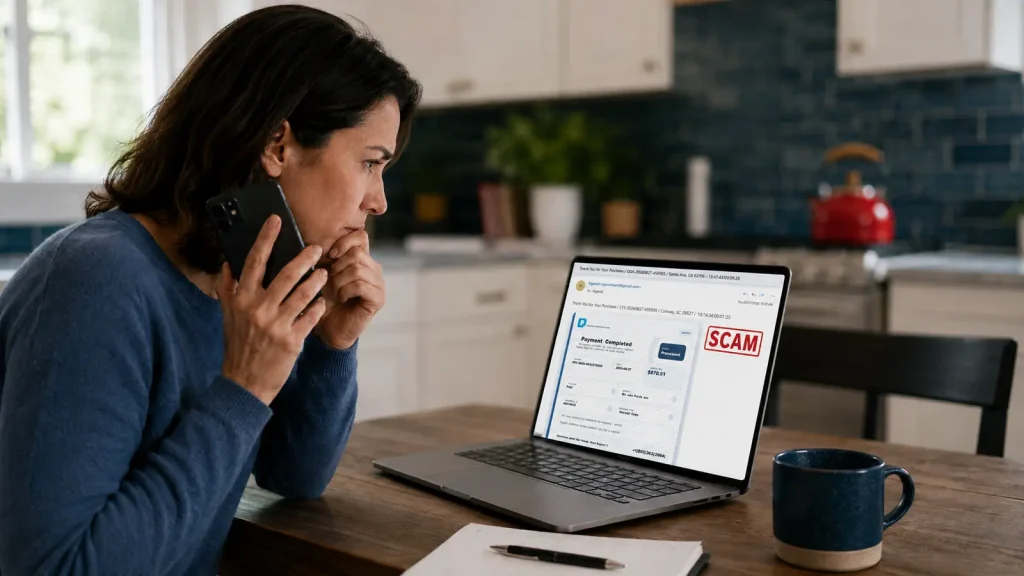
Received locally on August 27, 2026, this fake purchase confirmation email used a false Bitcoin charge, conflicting details, and a callback number to push the recipient toward a dangerous refund scam.
SCAM & FRAUD 101 | Scam Lesson
Lesson Overview
Today, August 27, 2026, a fake purchase confirmation email was received locally. E-Safe conducted an in depth analysis of the email, its visible receipt, and the available message headers to provide this safety awareness article.
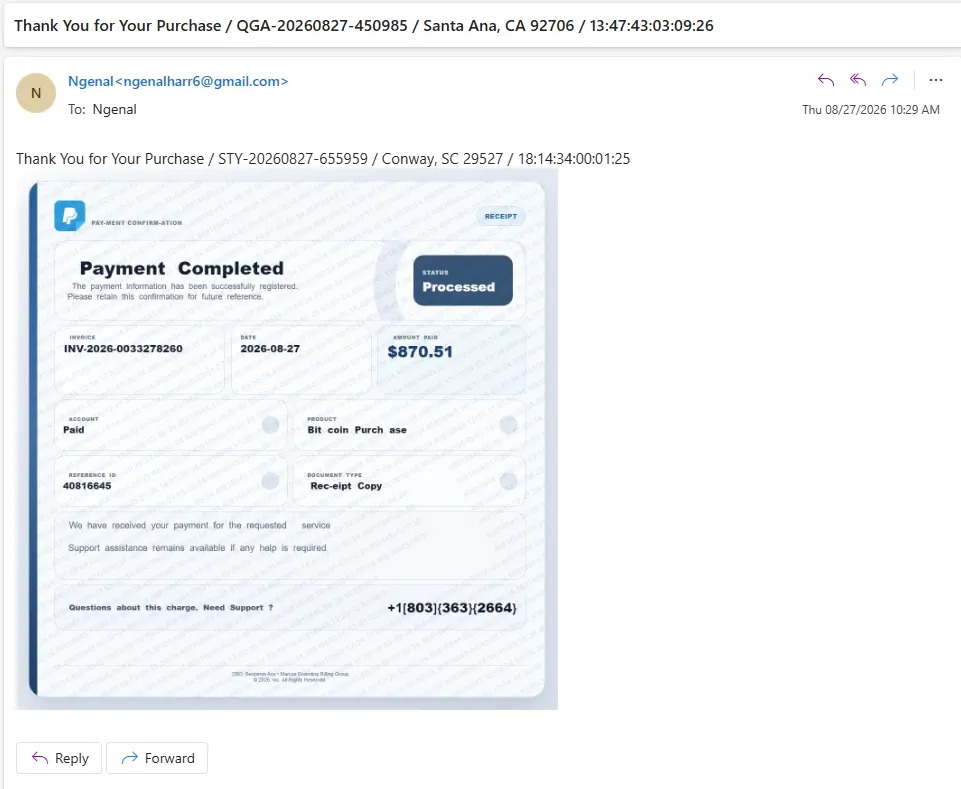
The email claimed that an $870.51 Bitcoin purchase had been processed and presented a telephone number for questions about the charge. The message was designed to make an unexpected charge feel urgent enough that the recipient would call before stopping to verify it independently.
Scam Type Fake purchase confirmation callback phishing
This is also known as a fake invoice scam, a telephone oriented attack delivery attempt, and a vishing or refund scam. The email is the bait. The telephone conversation is the likely attack.
The Email Received Locally
Flags in This Sample
- The sender is not an official payment service. The message came from a generic Gmail address with the display name “Ngenal,” not a verified company domain.
- The message uses several conflicting identities. The subject names reference QGA and Santa Ana, California. The body names reference STY and Conway, South Carolina. The embedded image filename refers to Wenatchee, Washington.
- The recipient information is unusual. The visible From and To fields contain the same Gmail address. That can occur when recipients are hidden, but the saved copy does not reveal the actual delivery list.
- The entire lure is an image. The short HTML body contains only an embedded receipt image. Image only messages can conceal important wording from simple text based filters and direct attention to a telephone number.
- The design imitates a trusted payment brand without a verifiable identity. It uses a blue payment symbol and receipt styling but provides no authentic merchant domain or official account link.
- The wording is awkward and manipulated. Examples include “PAY-MENT CONFIRMATION,” “Bit coin Purch ase,” and “Rec-eipt Copy.” These visual breaks are inconsistent with a professional receipt.
- The charge is unexpected and emotionally effective. A false $870.51 Bitcoin transaction can trigger panic because cryptocurrency payments are often perceived as difficult to reverse.
- The receipt lacks normal transaction details. It does not identify the customer, a legitimate merchant, a masked payment method, a complete product description, or a verifiable support website.
- The support contact is only a telephone number. The punctuation around the number is irregular, and an area code does not prove where a caller or scam operation is located.
- The billing identity is unsupported. The small print names “Marcus Doemling Billing Group,” but the message provides no reliable way to confirm that entity or connect it to a real purchase.
What the Email Headers Reveal
Visible sender: Ngenal using a Gmail address
Visible recipient: The same Gmail address shown as the sender
Message format: HTML with one embedded PNG image
Message identifier: A Gmail generated identifier
Missing from this saved copy: Received lines, Return Path, Authentication Results, DKIM signature, SPF result, DMARC result, and ARC records
Because the saved copy does not contain the normal delivery and authentication trace, it cannot establish the originating IP address, server, carrier, city, or the actual receiving mailbox. The contradictions and missing trace fields are warning signs, but they are not a basis for inventing an attribution.
In this sample, the visible content is a receipt image rather than an executable file. Merely viewing that image is not evidence that a device was infected. The primary danger is following the instruction to call, but unexpected attachments should still be treated cautiously.
How the Scam Works
- The scammer sends a false receipt or renewal notice for a charge the recipient does not recognize.
- The message tells the recipient to call a number to dispute, cancel, or refund the charge.
- A fake support agent asks for account information, verification codes, banking details, or access to the recipient’s computer or phone.
- The scammer may display a false refund, claim too much money was returned, and demand repayment by gift card, wire transfer, cryptocurrency, payment app, or cash.
- The criminal may also use remote access to steal credentials, search financial accounts, install unwanted software, or collect identity information for later fraud.
What to Do When You Receive One
- Do not call the number in the email, reply to the sender, or use any link or attachment provided with the message.
- Open the payment service or bank through its official app, or type the known website address yourself. Check your real activity there.
- If the email imitates PayPal, forward it to phishing@paypal.com and then delete it.
- Mark the message as phishing or junk and block the sender.
- Save the original email, screenshot, telephone number, and any related messages if you need to make a report.
- Report the attempt to the Federal Trade Commission at ReportFraud.ftc.gov. Significant cyber enabled losses can also be reported to the FBI Internet Crime Complaint Center at IC3.gov.
If You Already Called or Shared Information
- End the call and stop all communication.
- If remote access was granted, disconnect the device from the internet, remove the remote access software, and have the device checked by a trusted professional.
- From a clean device, change exposed passwords and enable multifactor authentication. Never approve an authentication prompt you did not initiate.
- Contact your bank, card issuer, payment service, or gift card company using a verified number. Ask whether a payment can be stopped or reversed.
- If identity information was exposed, visit IdentityTheft.gov and consider a fraud alert or credit freeze.
- Report the incident promptly. Fast action gives financial institutions and payment providers the best chance to limit the loss.
Why This Warning Matters
Imposter and support scams remain a major source of loss. Federal Trade Commission data show that consumers reported losing $3.5 billion to imposter scams in 2025. FBI data for 2025 show more than $2.1 billion in reported losses tied to tech and customer support schemes.
This single locally received email confirms that the method can reach local inboxes. It does not, by itself, prove a broader local campaign. The safest response is the same everywhere: pause, verify through a trusted channel, and never let an unexpected receipt choose the telephone number you use for help.
Bottom Line
A real company does not need you to call an unverified number in a frightening receipt to protect your account. If a purchase is real, it will appear in the official account or financial statement. If it is not there, the email is not evidence that money moved. Do not let the false charge move you into the scammer’s telephone conversation.
Professional Sourcing
- PayPal: Invoice scams and money request scams
- Federal Trade Commission: How to recognize and avoid phishing scams
- Federal Trade Commission: How to recognize a fake renewal scam
- Federal Trade Commission: What to do if you were scammed
- Federal Trade Commission: 2025 imposter scam data
- FBI Internet Crime Complaint Center: Tech support scams and fake refunds
- FBI Internet Crime Complaint Center: 2025 Internet Crime Report
- Georgia Attorney General Consumer Protection Division: Phishing