
Share this article
Consumer Protection · E-Safe News
Scammers Are Exploiting Your Digital Calendars to Deliver Fraud Directly to You
Criminals are placing fake billing and renewal notices on digital calendars to trigger panic and phone calls. Here is how the scam works, how entries appear, and how to protect yourself before…
Digital fraud is evolving, and one of the fastest growing attack methods is now targeting a tool most people trust without question: their digital calendar.
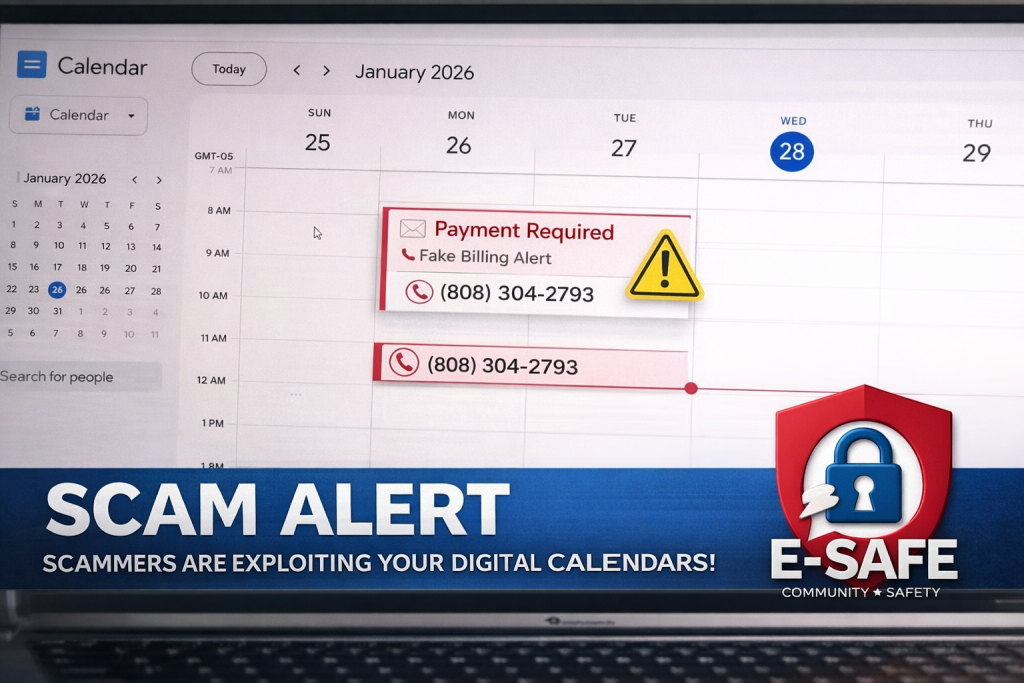
Cybercriminals are increasingly using what is known as calendar injection to place fraudulent billing notices, subscription renewals, and payment alerts directly onto a victim’s personal calendar. These entries often appear legitimate, trigger system notifications, and create a false sense of urgency that pressures individuals into immediate action.
Unlike traditional phishing emails, these scams do not rely on the victim opening a message. Instead, they exploit default calendar settings that automatically accept or display event invitations, allowing scammers to bypass typical spam filtering protections.
How a Calendar Alert Becomes a Scam
A recent example involved a fraudulent calendar entry claiming a multi year security subscription renewal costing over five hundred dollars. The entry included a fabricated membership number, a support phone number, and language indicating that the transaction had already been approved. There was no actual purchase. The goal was to trigger panic and prompt the victim to call the number provided.
Once contact is made, the scam escalates into a social engineering attack. Victims are often instructed to grant remote access to their device, disclose personal or financial information, or authorize a payment under the false belief they are resolving a legitimate charge.
This method is effective because it leverages trust in system generated notifications. Calendar alerts are perceived as internal, structured, and reliable, making users less likely to question their origin.
Why the Invitations Appear
These scams typically originate from malicious email invitations sent in bulk. When a user’s calendar settings allow automatic event creation from incoming messages, the fraudulent event is added without user interaction. Even if the email is never opened, the calendar entry still appears and triggers alerts.
Scammers favor this approach for several reasons. Calendar notifications create repeated exposure through reminders. They bypass many traditional email security layers. They also introduce a direct communication path through embedded phone numbers, allowing attackers to control the interaction in real time.
Warning Signs and Protective Steps
There are clear warning signs that users should recognize immediately. Any unexpected calendar entry involving a charge, subscription renewal, or urgent financial action should be treated as suspicious. Messages that reference approvals you did not authorize, contain generic department names, or push immediate contact through a phone number are strong indicators of fraud.
Protection begins with disabling automatic event additions from email invitations within your calendar settings. Users should only allow events from known and trusted senders. Any suspicious entry should be deleted without interacting with links or contact details.
It is also critical to verify any billing concern directly through official company websites, not through phone numbers or links provided in calendar events. This simple step can prevent most forms of escalation tied to this scam.
A Threat Inside Familiar Tools
Calendar based fraud represents a shift in attack strategy. Instead of competing with increasingly advanced email filtering systems, cybercriminals are embedding themselves into trusted digital tools that operate quietly in the background.
The result is a more persistent and convincing threat that blends into everyday routines.
E-Safe urges all community members to review their calendar settings immediately and remain cautious of any unexpected financial alerts appearing on their schedule. A notification on your calendar does not guarantee legitimacy, and in many cases, it may be the starting point of a targeted scam.
Sourcing
Federal Trade Commission (FTC)
Consumer Alerts and Fraud Prevention Resources
https://consumer.ftc.gov
Cybersecurity and Infrastructure Security Agency (CISA)
Phishing and Social Engineering Guidance
https://www.cisa.gov
Google Calendar Support Documentation
Event and Invitation Settings
https://support.google.com/calendar
Microsoft Outlook Support
Calendar Processing and Security Settings
https://support.microsoft.com
Kaspersky Security Research
Analysis of Calendar Based Phishing Techniques
https://www.kaspersky.com